The Liene M100 photo printer review comes down to a practical question: do you want to turn phone pictures into standard 4×6 prints at home without relying on a shared network?
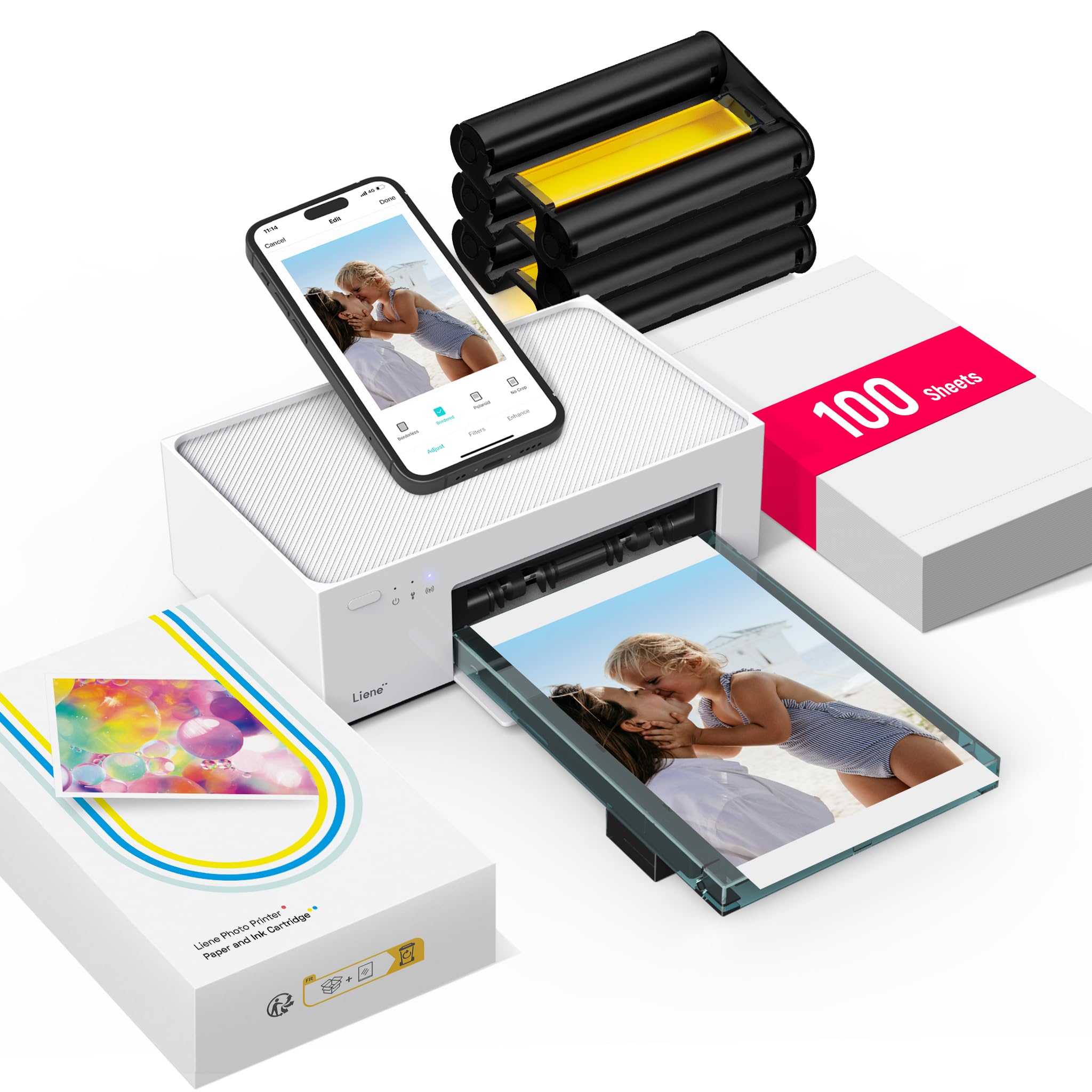
The M100 pairs a dedicated Wi-Fi hotspot and editing app with dye-sublimation printing, and its included paper and cartridges make it ready for a batch of keepsakes.
Liene M100 Review Summary
The quick verdict
4,000+ ratings
Read Amazon ReviewsLiene M100 Photo Printer
A fit for households and phone photographers who want convenient 4×6 prints, app-based edits, and a generous starter supply of paper and cartridges.
- Dye-sublimation color printing on glossy 4×6-inch photo paper, with borderless printing.
- Dedicated built-in Wi-Fi hotspot for direct connections; up to five devices can connect simultaneously.
- App tools include filters, square borders, brightness and contrast adjustments, and print-status checks.
- Compatible with smartphones and computers running iOS, Android, Windows, or Mac.

Pros
- Direct hotspot printing can simplify setup when a home network is inconvenient.
- The five-device connection allowance supports printing from multiple family members’ phones.
Consider before buying
- The M100 is a print-only photo device, so it is not suited to buyers seeking general document printing or scanning.
- Its 4×6-inch glossy-paper format is specialized; buyers who need other print sizes should check their workflow before choosing it.
Read the full review summary
The M100 is designed for straightforward photo printing from iOS and Android phones as well as computers. Its hotspot creates a direct connection, and the app offers basic adjustments such as filters, brightness, contrast, and borders.
Up to five devices can connect, which could suit a household that wants to print from several phones.
The 4×6 format works well for albums, frames, and everyday snapshots, while the included 100 sheets and three cartridges give new owners supplies for more than a handful of prints.
The tradeoff is a dedicated photo-printer workflow: it prints photos rather than serving as an all-purpose office printer, and replenishment uses Liene cartridges and glossy photo paper.
The buying factors
Liene M100 Scorecard
Editorial scores reflect listed features and buyer fit; they are not laboratory measurements or customer ratings.
Phone printing convenience
A built-in hotspot supports direct phone connections without requiring another network, and the app handles print status and edits.
Multi-device sharing
Up to five simultaneous connections make shared household use a central strength.
Print format versatility
The M100 focuses on standard 4×6-inch glossy photo prints, with app options for borders and ID or visa photo layouts.
Starter supply value
The package includes 100 sheets of photo paper and three color cartridges, supporting a substantial initial print batch.
Editing flexibility
The app provides filters, square borders, brightness and contrast adjustments, plus print-status information.
Portability and storage
Its compact, minimalist design and magnetic storage feature help with stowing it, though the supplied details do not establish battery-powered operation.
Key Features and Specifications of Liene M100
- Dye-sublimation color printing on glossy 4×6-inch photo paper, with borderless printing.
- Dedicated built-in Wi-Fi hotspot for direct connections; up to five devices can connect simultaneously.
- App tools include filters, square borders, brightness and contrast adjustments, and print-status checks.
- Compatible with smartphones and computers running iOS, Android, Windows, or Mac.
- Package includes 100 sheets of photo paper, three color cartridges, and a sealed cassette intended to help keep dust away.
- Magnetic, minimalist design intended for compact storage.
- USB Type-C interface and a 12-month warranty.
Pros and Cons of Liene M100
Pros
- Direct hotspot printing can simplify setup when a home network is inconvenient.
- The five-device connection allowance supports printing from multiple family members’ phones.
- A 100-sheet paper supply and three cartridges provide a useful starting batch.
- The app allows simple edits before printing, including brightness, contrast, filters, and borders.
Consider before buying
- The M100 is a print-only photo device, so it is not suited to buyers seeking general document printing or scanning.
- Its 4×6-inch glossy-paper format is specialized; buyers who need other print sizes should check their workflow before choosing it.
- Ongoing use depends on compatible Liene cartridges and photo paper, so consider the availability and cost of replenishments for your expected print volume.
Who Should Buy Liene M100?
Good fit
Consider the M100 if your main goal is making physical 4×6 copies of phone photos for albums, frames, gifts, or family gatherings.
The dedicated hotspot and app-based controls keep the workflow centered on phones, while support for up to five simultaneous connections may be useful when several people want to print.
The included supplies make it easier to begin with a larger print session than a small sample pack would allow.
Before buying, think about how often you will print and whether you are comfortable keeping compatible Liene paper and cartridges on hand.
Who should skip it
Look elsewhere if you need one printer for both photos and routine office documents, or if scanning is part of your regular workflow. The M100 is specified as print-only.
It may not suit a workflow built around formats other than 4×6 glossy photos. Check that size and the app-based process match the way you plan to use your prints.
How the Liene M100 Fits a Home Photo-Printing Routine
A direct connection built around phones
The M100’s independent hotspot avoids depending on the household Wi-Fi network for a phone-to-printer connection.
That can make spontaneous printing more convenient, while the stated allowance of up to five connected devices makes it plausible to share across a household.
The app remains part of the workflow, so buyers should be comfortable selecting and preparing photos on a phone or compatible computer.
A focused 4×6 format
Standard 4×6 prints are a familiar size for albums and frames, and borderless output can make a photo fill the sheet.
The fixed maximum media size is a constraint for anyone who wants larger enlargements or small sticker prints. App options for square borders and ID or visa layouts add some presentation flexibility without changing the paper size.
What dye-sublimation means for the routine
The printer uses dye-sublimation, a process described as placing color dyes into the paper and finishing the surface with a protective laminate.
The listed surface resistance to water, scratches, fingerprints, and fading is a design benefit for handling and keeping prints. If a print develops smudges during operation, the product instructions call for promptly cleaning the print head.
Plan for supplies and storage
The box’s 100 sheets and three cartridges are a meaningful convenience for a new owner who wants to print a collection soon after setup.
For longer-term use, the proprietary cartridge requirement makes replenishment a practical part of ownership; check compatible supply options and ongoing costs against your expected volume. The magnetic design is intended to help keep the printer compact when stored.
Alternatives to Liene M100
Desktop Photo Printers alternative

19,000+ ratings
Read Amazon ReviewsKODAK Dock Plus 4×6 Photo Printer
Choose the M100 if direct hotspot sharing across several devices and its larger included paper supply suit your routine. Consider the Dock Plus if you prefer a built-in phone dock and Bluetooth-based connection for a home printing station.
- The KODAK Dock Plus prints 4×6 photos using 4PASS dye sublimation and connects to compatible iOS and Android phones over Bluetooth.
- Its integrated phone dock can charge a phone during printing, and the app supports editing, cropping, and customization.
- The Liene M100 uses a dedicated Wi-Fi hotspot, supports up to five simultaneous connections, and includes 100 sheets with three cartridges.
Battery-focused alternative

500+ ratings
Read Amazon ReviewsLiene M200 Battery Edition
The M200 is the more suitable option if you want to print away from an outlet and its stated battery capacity fits your plans.
The M100 is a simpler fit if you expect to print near power and value the 100-sheet, three-cartridge starter package.
- The Liene M200 Battery Edition adds a rechargeable battery, with the product description specifying up to 40 prints per charge.
- It also offers a built-in hotspot, support for up to five simultaneous users, and 4×6 dye-sublimation printing.
- The Liene M100 is a 4×6 dye-sublimation printer with direct Wi-Fi hotspot printing and no stated built-in battery operation.
Is Liene M100 Worth It?
The Liene M100 is worth considering for phone-first households that want a direct connection, shared access, and standard 4×6 prints, especially with a large starter supply included.
Its app edits and compact storage design make the workflow approachable for everyday snapshots.
Buy it if 4×6 photo printing is your main need and you are comfortable buying compatible Liene supplies over time.
Choose a different type of printer if your routine also calls for documents, scanning, other photo sizes, or printing away from a power source.
Your review at a glance
4,000+ ratings
Read Amazon ReviewsLiene M100 Photo Printer
A fit for households and phone photographers who want convenient 4×6 prints, app-based edits, and a generous starter supply of paper and cartridges.
- Dye-sublimation color printing on glossy 4×6-inch photo paper, with borderless printing.
- Dedicated built-in Wi-Fi hotspot for direct connections; up to five devices can connect simultaneously.
- App tools include filters, square borders, brightness and contrast adjustments, and print-status checks.
- Compatible with smartphones and computers running iOS, Android, Windows, or Mac.